












2025 marks a turning point for AI-powered creativity, and leading this wave is Kling AI video generator. Now at Version 2.0, Kling AI claims to offer the fastest, smartest, and most feature-rich text-to-video tool in its class. But does it live up to the hype? In this in-depth review, you'll discover what Kling AI brings to the table, how it compares to top competitors, and practical tips for maximizing its potential.

In This Article
01 What is Kling AI Video Generator?
Kling AI is an AI-driven platform for creating imaginative videos and images from text, image, and even video prompts, blending advanced generative models with cinematic quality outputs. Designed for both casual creators and professionals, Kling AI stands out with its ability to render dynamic scenes, support multi-modal inputs, and provide fine object-level control.

01 Core Features and Capabilities
- Text-to-Video Generation: Enter a prompt, and Kling AI transforms your ideas into cinematic video clips.
- Image-to-Video Conversion: Upload static visuals and generate motion scenes with added depth and effects.
- Multi-Modal Reference System: Combine text, images, or video clips as input prompts for complex scene generation.
- Advanced Editing Tools: Add, swap, or delete objects within videos using prompt-based controls, a major leap in creative freedom.
- Cinematic Motion & Environment Rendering: Kling AI excels in dynamic camera motions, detailed environments, and realistic character animation.
- Integrated Sound Effects: Newer releases support audio embedded directly in video outputs.
- Kolors 2.0 Integration: A bundled tool for high-end AI-generated images, expanding creative possibilities.
02 Pros and Cons (Honest Review)
Pros
- Cutting-edge AI-driven video quality and motion realism.
- Flexible multi-modal prompt system for broad creativity.
- Editing tools enable object-level scene adjustments.
- Integrated sound effects enhance videos.
- Responsive user interface and regular updates.
Cons
- Still lacks proper lip-sync for animated characters.
- No unlimited plan; credit system can be expensive for high output.
- Some features from earlier versions (e.g., Creativity Slider, End Frame) have been removed.
- NSFW content is strictly filtered.
02 What's New in Kling AI 2.0?
Building on its already powerful foundation, Kling AI 2.0 arrives with a host of innovative upgrades designed to elevate both the creative process and the final video output. This latest version not only enhances the platform's core strengths but also introduces entirely new functionalities that set a higher standard for AI video generation. Here's a breakdown of the most significant improvements and updates you'll find in Kling AI 2.0:
- Multi-element Prompting: You can now prompt Kling with more complex instructions, involving multiple characters, objects, and actions within a single input.
- Multi-modal References: Now supports using text, images, and even video snippets as scene references, opening new creative workflows.
- Editing with Swap/Add/Delete: Prompt-based editing lets you structure and modify video elements with unprecedented precision.
- Cinematic Improvements: Enhanced dynamic motion, camera tracking, and environmental rendering for more lifelike scenes.
- Kolors 2.0: Upgraded image generation included as a creative add-on.
- Removed/Missing Features: Creativity Slider and similar controls have been retired. Lip-sync and unlimited plans remain absent.
03 Hands-On Tutorial: How to Use Kling AI
Ready to get started with Kling AI? Here's a step-by-step guide:
- Sign Up: Register on Kling AI's official website and select a suitable plan (Free/Standard/Pro/Enterprise).
-
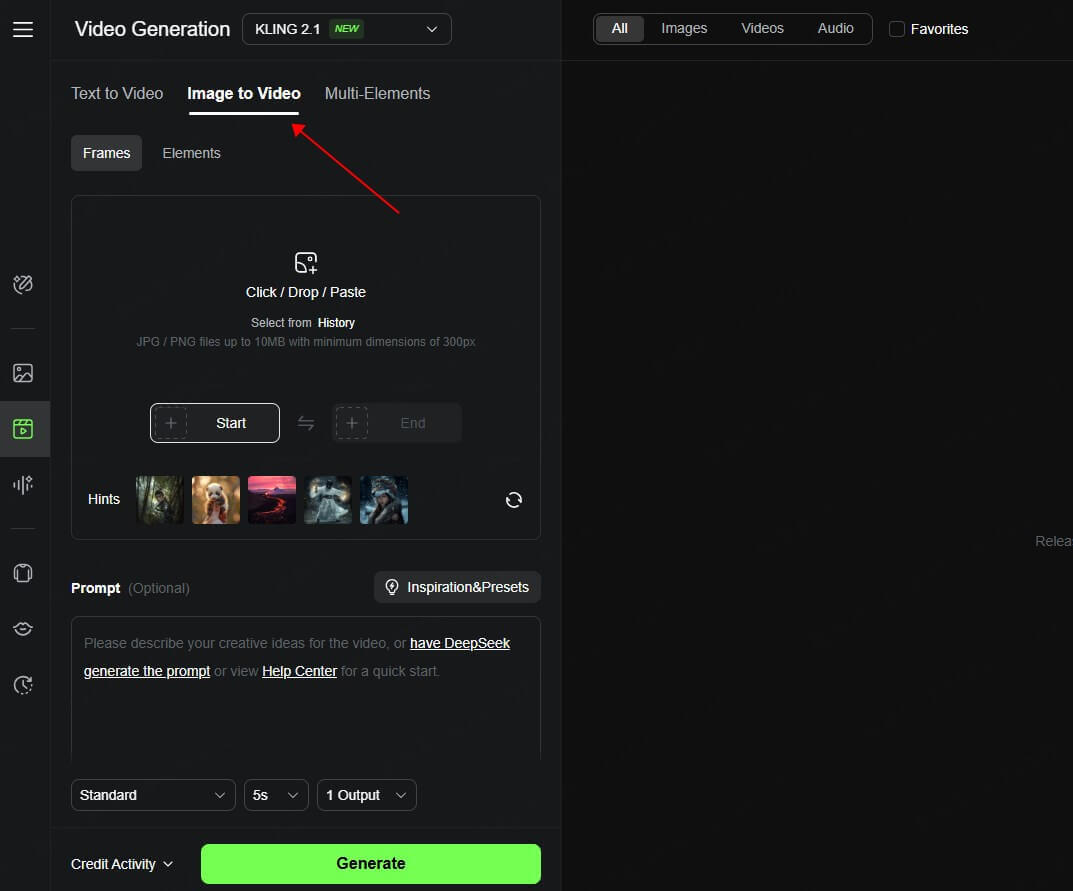
Choose Creation Mode: Pick between text-to-video or image-to-video generation.
-
Enter Your Prompt:
For simple scenes, provide a detailed text description.
For complex scenes, combine elements (e.g., "A woman looks down as a parrot lands on her hands, city skyline in the background").
Use images/video snippets as references if desired.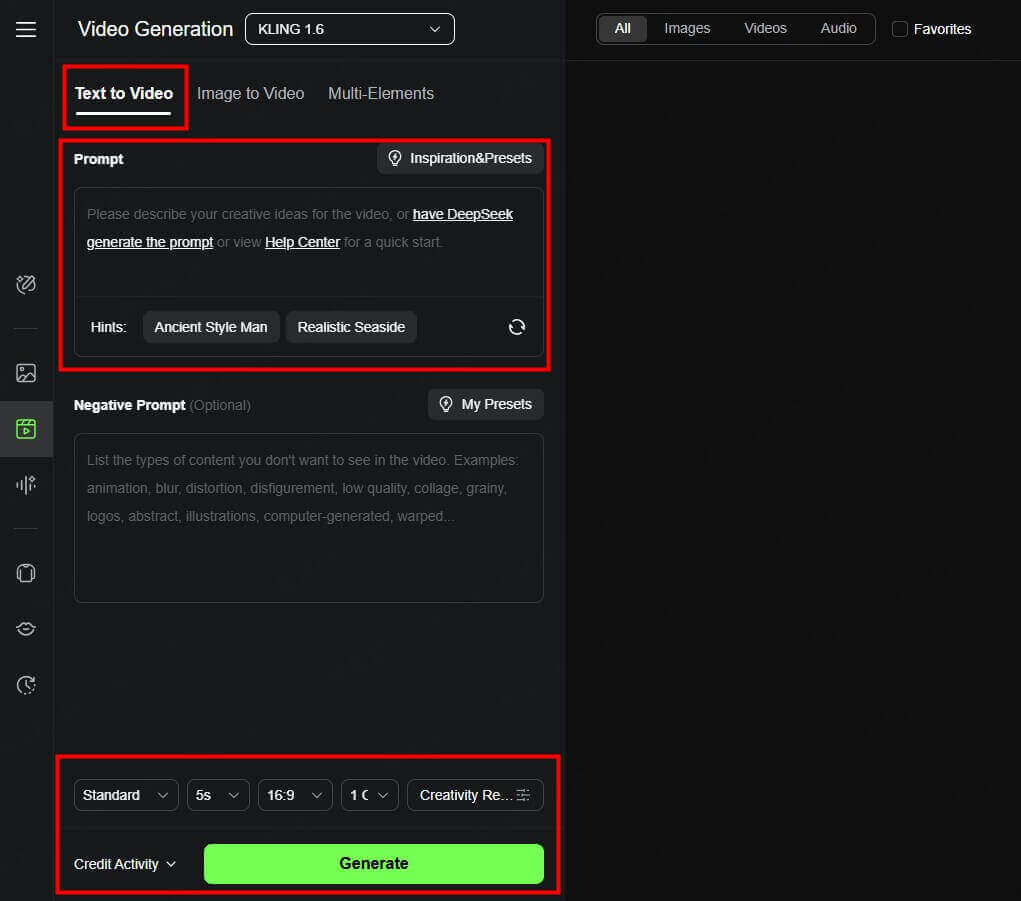
- Advanced Editing: Use targeted prompts to add, swap, or delete objects within the scene for stronger narrative or composition.
- Adjust Settings: Select output length (remember: 5 seconds costs 100 credits), motion style, and sound options.
- Render & Download: Preview the video, make adjustments, and download the final product.


Tips
- Short, vivid prompts produce more predictable results.
- Experiment with multi-modal inputs for richer scenes.
- Keep an eye on credit consumption!
04 Pricing and Plans: How Much Is Kling AI
Kling AI's pricing combines monthly subscription tiers and a credit-based generation model:
| Plan | Price/Month | Credits | Example Output | Free Trial |
|---|---|---|---|---|
| Free Trial | Free | Limited | Watermarked, few seconds | Yes |
| Standard | $10 | 660 | Several 10-sec videos | No |
| Basic | $29 | 1,800+* | 15-20 videos (10 sec each) | Yes |
| Pro | $79 | Higher limit | Professional workloads | No |
| Enterprise | Custom | Custom | Team/large-scale needs | No |
*Kling credits are consumed at approx. 100 credits per 5 seconds of video.
Compared to Runway and Luma, Kling's Standard and Pro plans offer competitive pricing for high-quality results. Be aware that some competitors offer more credits or lower costs per second, but Kling stands out in motion and editing capability.
05 Kling AI vs. Other Top AI Video Generators
How does Kling AI compare to Pika, Runway, Luma, and Fliki? Here's a quick breakdown:
| Platform | Unique Strengths | Weaknesses | Pricing Highlights |
|---|---|---|---|
| Kling AI | Advanced cinematic quality, editing freedom | Credit system, lip-sync gap | \$10+/month for 660+ credits |
| Runway | User-friendly, good face rendering | Fewer editing controls | \$35/month for 2250 credits |
| Luma | Simpler UI, AI avatars, low-res free trial | Less customization | \$29.99/month for 10,000 credits |
| Pika | AI script-to-video speed, basic editing | Less cinematic realism | Similar range |
| Fliki | Text/article-to-video, strong AI voices | Less visual quality | Similar range |
Kling AI's multi-modal prompts and scene editing flexibility put it ahead for creators demanding full control, while others may appeal for simplicity or pricing.
06 Final Verdict: Is Kling AI Worth It in 2025?
Kling AI 2.0 is a powerful choice for creators seeking cinematic video generation, deep creative controls, and multi-element prompts. It outpaces many rivals in scene complexity, camera motion, and editing, though it comes at the cost of a credit-based system and the continuing absence of features like unlimited plans and full lip-sync for characters. If you are a video marketer, educator, creative professional, or anyone needing rapid video ideation with some editing freedom, Kling AI should be on your shortlist.
07 FAQ Section
01 How to Get Kling AI in United States?
Kling AI is now officially available for users in the United States. Simply visit the Kling AI website, sign up, and select your desired plan. Both free and paid options are available.
02 Does Kling AI Allow NSFW?
No, Kling AI strictly prohibits NSFW (Not Safe For Work) content. There are robust filters in place, and the platform has patched various loopholes to block such uploads.
03 How to Cancel Kling AI Subscription?
You can manage and cancel your Kling AI subscription via your account settings, typically through the payment provider (such as Stripe). Simply locate your subscription and select "cancel subscription" for an immediate stop to ongoing charges.
Looking for More AI Video Power? Try LitVideo with Kling AI Model!
LitVideo is a multi-model video generator that integrates Kling AI, Vidu AI, and more—offering flexible, high-quality video creation all in one platform. Discover smarter, faster AI video generation with LitVideo today!
Share article:


